
I built a 128GB Strix Halo desktop for local LLMs. The bottleneck wasn't RAM.
I thought I could stop paying for Claude. Then my local LLM hit 9.57 tokens/sec.

The failure was interesting, because what went wrong is the thing nobody mentions when they tell you to buy a big memory machine and run models locally.
Here’s the short version: I bought a Framework Desktop: AMD Ryzen AI Max+ 395, 128GB LPDDR5x soldered. The reason you buy this hardware is that the CPU and GPU share one big pool of RAM, so you can load models that would never fit on a consumer graphics card. A practical 70B local model, at a quality level I would actually want to use, can easily need more memory than a 4090’s 24GB of VRAM. This machine could hold it without blinking.
It held it. It just ran it slowly. And the reason had nothing to do with the 128GB memory.
The disappointing benchmark
The first model I tried seriously was Qwen3.6 27B, a dense model, quantised to Q6_K. About 21GB on disk. Comfortably inside my memory budget with most of the RAM to spare.
It generated at 9.57 tokens per second.
To put that in human terms: a detailed coding answer took the better part of five minutes to print. Watching it was like watching someone type with one finger. My MacBook, calling a cloud model, felt instant by comparison. The machine I’d bought to be fast was the slowest part of my setup.
My first instinct was the one everyone has: I’d misconfigured something. A flag I’d missed, a driver I hadn’t installed, a magic setting that would unlock the performance I’d paid for. I spent an embarrassing amount of time hunting for that flag.
There was no flag. The machine was doing exactly what the hardware allowed. I just didn’t understand yet what the hardware allowed.
The calculation I should have done first
a brief moment of envy!
“Physics saw family and respectfully backed off.” — r/shittymoviedetails
We have no such arrangement with physics.
Here is the thing I missed when I first planned this months ago, and the single most useful idea in this post.
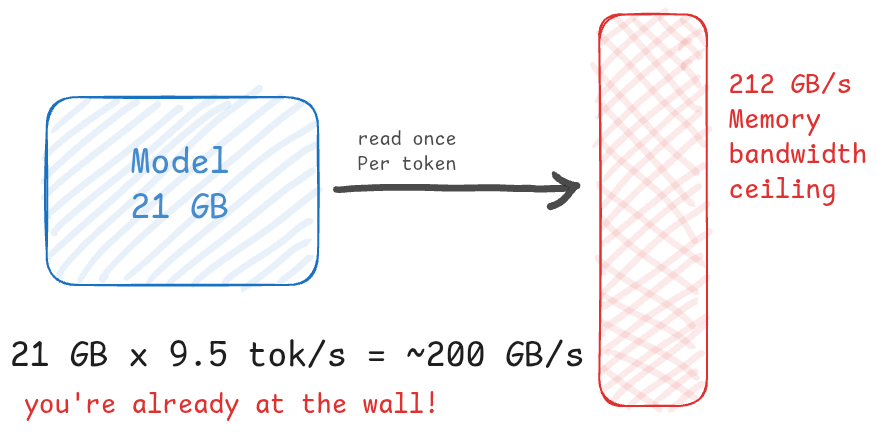
For a dense model, the useful first-order mental model is this: generating each token means streaming the model weights through memory again. A 21GB dense model is therefore roughly a 21GB memory-read problem per generated token. There’s no way around it: the math of how these models work touches every weight to produce every output token.
So the speed ceiling isn’t about how fast your processor computes. It’s about how fast your memory can be read. And that’s a number you can look up.
Model size (GB) × tokens per second = GB/s of memory bandwidth consumed
21 GB × 9.57 tokens/sec ≈ 200 GB/s
My hardware’s memory bandwidth is ~ 212 GB/s. That’s the measured GPU figure against a theoretical 256 GB/s peak.
Look at those two numbers. 200 and 212. The model wasn’t slow because of a configuration mistake. It was slow because it read 21GB per token and the memory could only deliver about 212GB a second. Do the division and you get roughly ten tokens. I was already at the ceiling. There was no flag because there was no room.
This isn’t a complete model of inference performance. Real speed also depends on quantisation, the backend, prompt processing, KV cache, batching, and driver maturity. But it’s the first calculation I should have done, and it would have saved me hunting for a flag that never existed.
If you’re eyeing unified memory hardware, run this division before you buy: model size you want, times the TPS you’d accept, checked against the bandwidth on the spec sheet. If the first number is bigger than the second, no amount of tuning will save you.
The part that surprised me
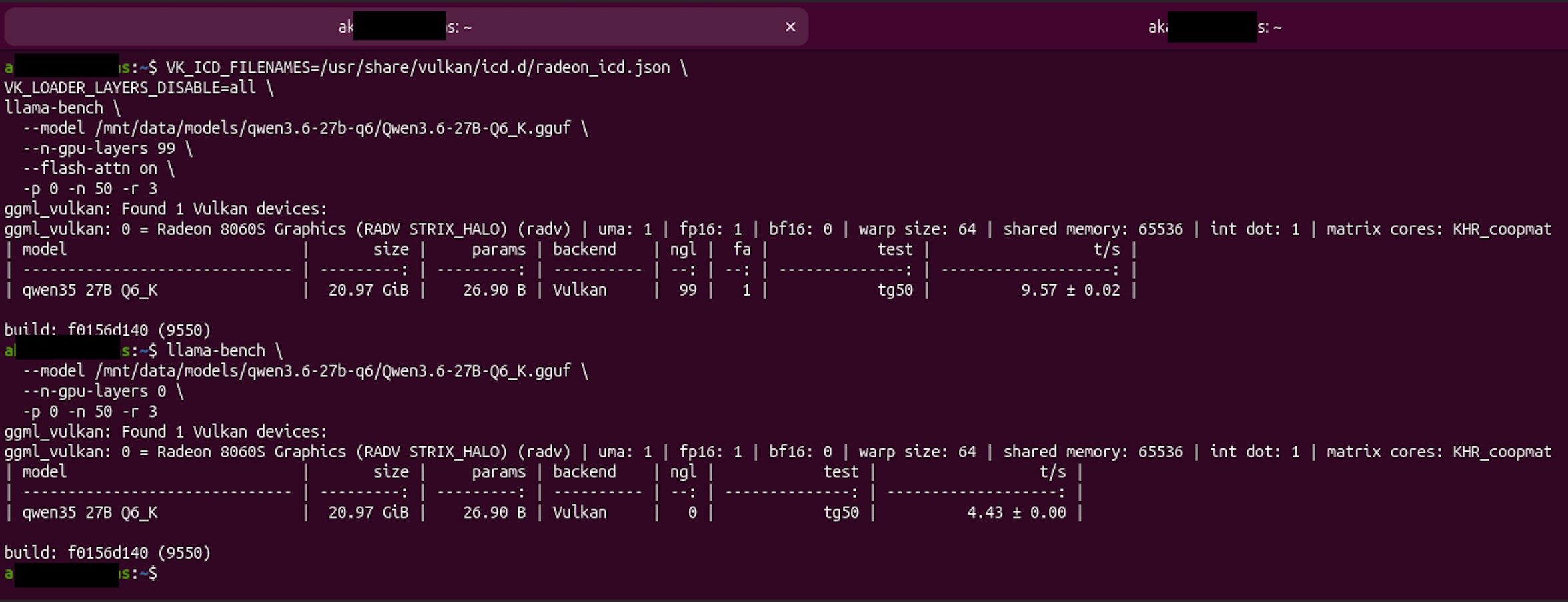
Once it was clear I was bandwidth bound, I tried something I expected to be a dead end, mostly to confirm it was one: I ran the same model on the CPU instead of the GPU.
This should be slower. The GPU is the part you accelerate inference with; the CPU is the fallback for when the GPU isn’t an option.
The CPU ran at 4.43 tokens per second. So yes, slower than the GPU’s 9.57. The GPU won.
But it only won by about 2x. On a task the GPU is supposedly built for, against a CPU doing it the hard way, the gap was a factor of two. That’s not the blowout you’d expect.
And the reason is the whole point: both are pulling from the same memory at the same ~212 GB/s. The GPU is faster at the math, but the math was never the bottleneck. They’re standing at the same wall. The GPU just reaches it quicker.
There’s a lesson here beyond my specific chip. On unified memory hardware, “should I run this on the CPU or the GPU?” doesn’t have the obvious answer. It depends on whether the GPU driver is mature enough to pull ahead, and on how bandwidth bound the workload is. With a brand new GPU and immature drivers, the GPU’s advantage can be much smaller than the marketing implies. Benchmark both. Don’t assume.
The actual fix: stop reading the whole model
If the problem is that the model reads all 21GB of itself for every token, the fix is obvious once you say it out loud: use a model that doesn’t.
That’s what a Mixture of Experts model does.
A dense model activates every parameter for every token. A MoE model has many “expert” sub networks and, for any given token, only activates a small fraction of them. The model can be 30 billion parameters in total but read only about 3 billion per token. Same total size in memory, but a fraction of it gets touched on each pass.
Run the bandwidth math again with that change:
Dense 21GB model: reads ~21GB per token → ~9.5 tokens/sec
MoE 30B model (3B active): reads ~3.5GB per token → ~60+ tokens/sec
Same hardware. Same bandwidth. Same physical wall. But each token now reads a sixth of the data, so you get roughly six times the tokens before you hit the ceiling.
I switched to Qwen3 30B A3B, a MoE model. It generated at 66.40 tokens per second.
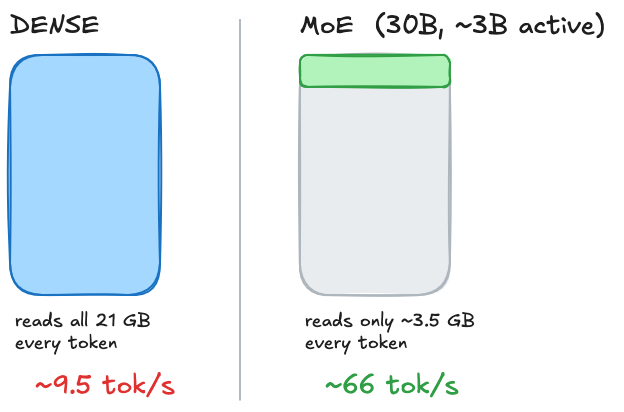
From 9.57 to 66.40. Seven times faster. No new hardware, no overclock, no magic flag — just the realisation that the bottleneck was how much of the model gets read per token
Why I build llama.cpp from source instead of using Ollama
A quick detour, because this is the second most useful thing I learned and it generalises.
Most people running local models use Ollama, and for most people that’s the right call. It’s easy, it works, you don’t think about it. I’m not here to tell you Ollama is bad.
But Ollama bundles a specific, pinned version of llama.cpp as its inference engine. When I first drafted this plan in March, that version was stuck on a December 2025 build of llama.cpp, missing two Vulkan performance patches that mattered specifically for AMD APUs. The community had documented a ~56% throughput gap on chips like mine. Building from source was the obvious call.
By the time I actually did the build in June, the picture had shifted. Ollama had bumped its bundled llama.cpp to b9509, which is what they currently ship. My build is on b9550 — about four days ahead of Ollama. The patches that drove the original 56% claim are now firmly inside what Ollama bundles. I haven’t yet run the two head to head on my hardware, but the gap today is likely small.
I still build from source because I want patches the moment they land and the rebuild is ten minutes.
Still, the lesson generalises: if your hardware is newer than the tool’s bundled backend, benchmark the backend, not just the model.
The convenient wrapper is convenient because it’s pinned to a known good version, and “known-good” was decided before your hardware existed.
What the setup actually looks like now
The finished thing is less exciting than the journey, which is how it should be.
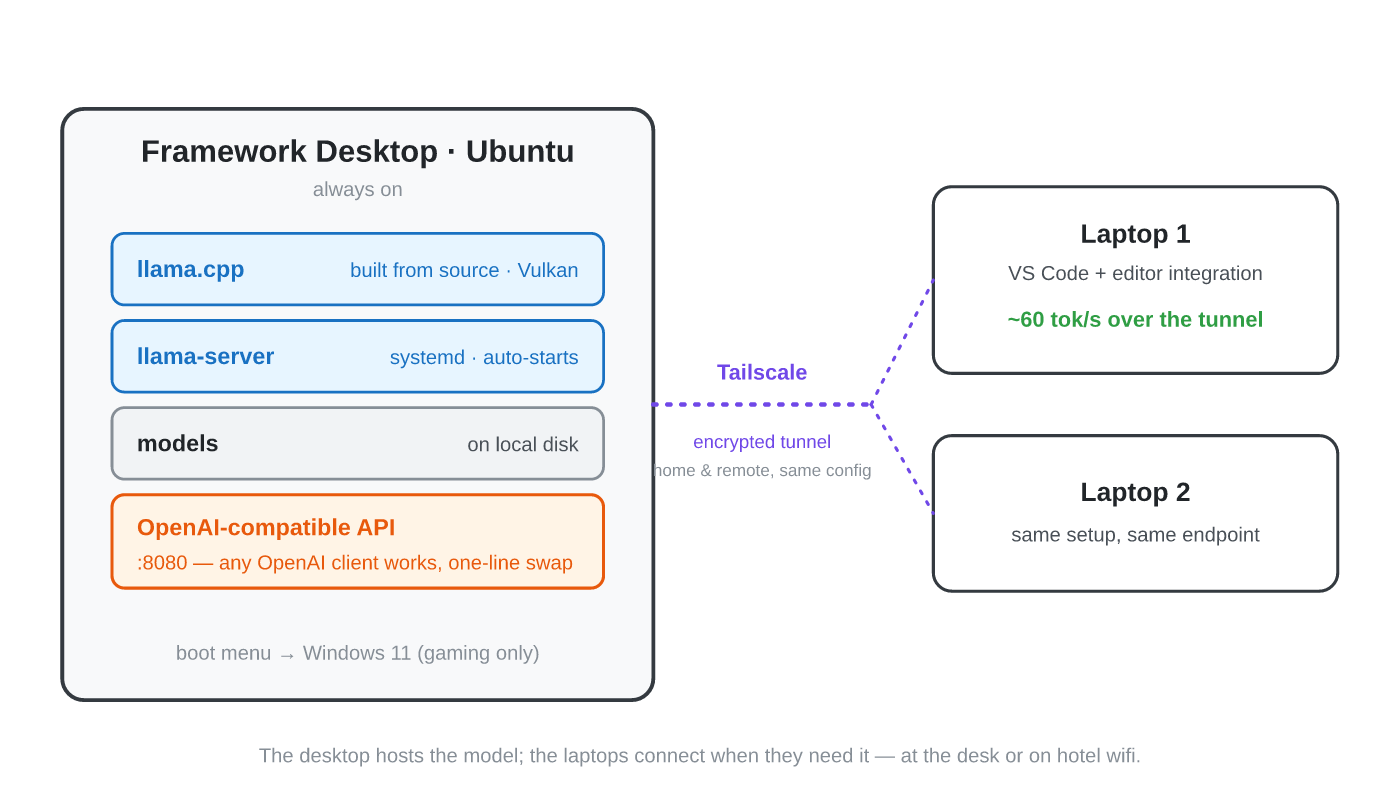
The Framework Desktop runs Ubuntu and hosts the model through llama-server, which speaks the same API format as the commercial providers. That detail matters more than it sounds: because the local server mimics the OpenAI API, every tool that can talk to OpenAI can talk to my desktop instead, with a one line change.
All the family Mac’s reach the desktop over Tailscale, a private encrypted tunnel, so the same setup works at my desk or on hotel wifi. The desktop is always on; the laptops connect when they need to.
Over that tunnel, from the MacBook, I get about 60 tokens per second from the desktop model. The network overhead is negligible. It feels local even when it isn’t.
A note on WSL2, since someone will ask
I run Linux as the primary OS and keep Windows on a separate partition for PC gaming. The obvious shortcut would have been WSL2: keep Windows, run Linux underneath it, run the server in there. I evaluated it and didn’t use it.
The reason is operational, not tribal. The inference server needs to be available all the time, so both my MacBook and my partner’s can reach it whenever the desktop is on. WSL2 requires Windows to be running, adds a virtualisation layer with measurable overhead, and makes the always on setup more fragile.
Dual booting with Linux as default and Windows as the gaming partition is simpler and faster for what I need. The decision was about uptime and latency.
What I’d do differently
If I were starting again, knowing what I now know:
I’d start with a MoE model on day one instead of spending a couple of days optimising a dense model that was never going to be fast.
I’d benchmark CPU against GPU early. The narrow gap between them was the clue that pointed at bandwidth as the real constraint, and I found it by accident. I should have looked on purpose.
The mistake underneath both was the same: I thought local LLM performance was about fitting the biggest model into the most memory. It isn’t.
I did not, in the end, stop paying for Claude. But I learned exactly what my hardware is and isn’t good at, which is worth more than the subscription.